How to Install Smart Blinds for Renters Without Drilling: A Step-by-Step Guide
Introduction
This guide explains how a renter can transform ordinary windows into smart, automated openings without damaging the rental property. The reader will learn how to measure, select, install, and configure motorized blinds that use adhesive or no‑drill mounting systems. By following the instructions, one can enjoy the convenience of remote‑controlled shading while preserving the original wall finish.
The value of this approach lies in its ability to increase privacy, reduce energy consumption, and enhance comfort without violating lease agreements. The guide also highlights affordable products that have received strong customer feedback, ensuring that the recommended tools are reliable and cost‑effective.
What You’ll Need
- Measuring tape
- Level and pencil
- Cleaning cloth and mild cleaner
- Adhesive extension blocks (included with most no‑drill blinds)
- Battery pack or AA batteries (depending on blind model)
- Smartphone with Wi‑Fi
- Optional smart hub for voice control
The following products serve as ready‑made solutions for each of these requirements:
- Hapadif Motorized Blinds
- SwitchBot Smart Blind Kit
- MUSCLEAREA Motorized Blinds
- MANSNIX Motorized Blackout Blinds
- Hapadif Motorized Roller Shades
Step‑by‑Step Instructions
Step 1: Measure the Window Opening
Begin by measuring the width and height of the window opening at the top rail where the blind will be mounted. Use a steel tape for accuracy and record the dimensions to the nearest millimeter. This measurement determines which size of no‑drill blind will fit without trimming.
For most renters, a width of 34‑35 inches and a height of 72 inches is common. The products listed above include models that match these dimensions, eliminating the need for custom cuts.
Step 2: Choose a No‑Drill Blind That Matches Your Measurements
Select a blind that offers a no‑drill installation method. The Hapadif Motorized Blinds provide a simple adhesive extension block that fits inside the upper rail. They are priced at $89.60, have a rating of 4.3/5 from 510 reviews, and include a blackout three‑layer fabric that protects against UV rays and provides privacy.
Alternatively, the SwitchBot Smart Blind Kit is designed for retrofit on existing horizontal blinds. Priced at $164.99 with a 4.4/5 rating from 800 reviews, it includes a solar‑charged motor and a hub for voice control.
If a solar‑powered solution is preferred, the MUSCLEAREA Motorized Blinds feature an integrated solar panel and are priced at $94.99 with a 4.1/5 rating.
For renters who need a blackout fabric at the lowest price, the MANSNIX Motorized Blackout Blinds cost $80.74, carry a 4.2/5 rating, and use a patented no‑drill design.
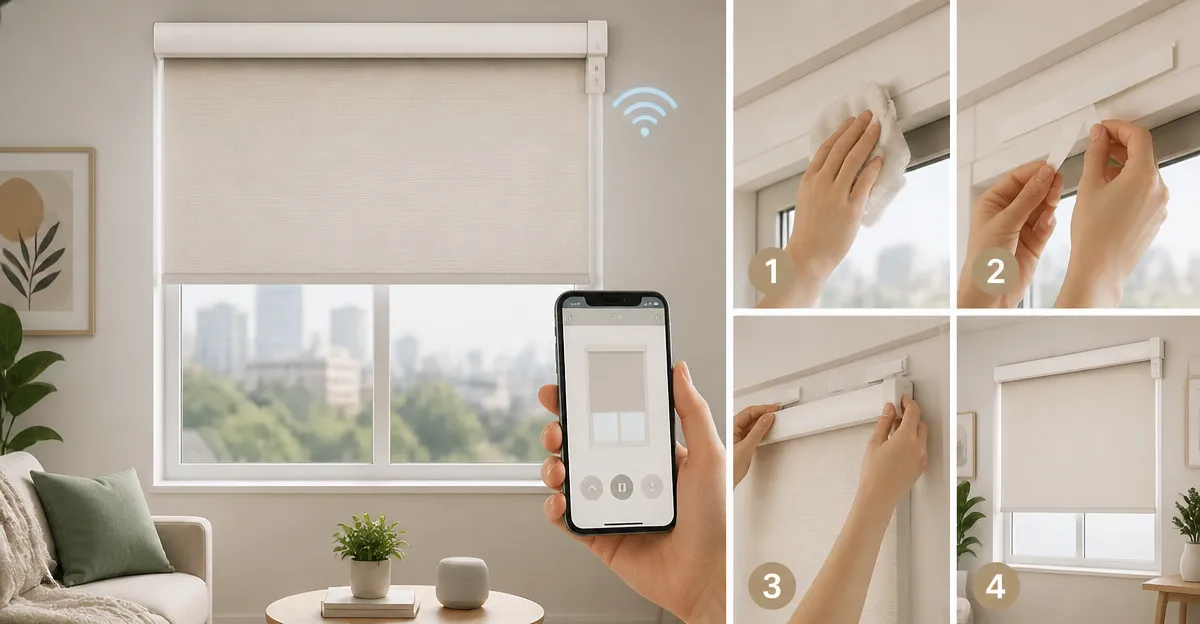
Step 3: Prepare the Window Frame
Clean the area where the adhesive block will be placed. Use a lint‑free cloth and a mild glass cleaner to remove dust, grease, or residue. Allow the surface to dry completely before proceeding. Proper preparation ensures that the adhesive bond will hold the weight of the motorized shade.
For blinds that rely on AA batteries, such as the MANSNIX model, verify that the battery compartment is accessible after installation.
Step 4: Install the Adhesive Extension Block
Take the adhesive extension block supplied with the chosen blind and press it firmly into the groove of the upper rail. The block is designed to hold the motor housing without the need for screws. For the Hapadif Motorized Blinds, only a single block is required; adding more blocks may reduce the effectiveness of the seal.
Press the block for at least 30 seconds to allow the adhesive to set. If the block does not sit flush, gently reposition it before the adhesive cures.
Step 5: Attach the Motorized Blind to the Block
Slide the motorized blind’s upper rail onto the installed block until it clicks into place. The motor housing should align with the block’s slot, providing a secure connection. For the SwitchBot kit, attach the motor to the blind’s tilt wand using the supplied cardboard template and adhesive pads.
Ensure that the remote control or hub is within reach of the battery compartment. The SwitchBot Smart Blind Kit includes a 2000 mAh lithium battery and a solar panel that can be mounted on the window frame for continuous charging.
Step 6: Power the Blind and Perform a Test Run
Insert the required batteries. The Hapadif and MANSNIX models use AA batteries, while the SwitchBot and MUSCLEAREA models contain rechargeable lithium cells. Turn on the blind using the remote control and verify that it opens and closes smoothly across the full range.
If the blind stops midway, check for obstructions in the rail and ensure that the battery is fully charged. The SwitchBot motor includes a built‑in light sensor that can automatically adjust tilt angles; calibrate this sensor during the test run.
Step 7: Configure Smart Controls (Optional)
For users who desire voice activation, connect the blind to a smart hub. The Hapadif blinds require the AX290 motor bridge, which can be paired with Alexa or Google Assistant. The SwitchBot kit includes a Hub Mini that enables remote control via the SwitchBot app and integration with Siri, Alexa, and Google Home.
Download the relevant app, create an account, and follow the on‑screen pairing instructions. Once paired, create daily schedules such as “Open at sunrise” and “Close at sunset.” This automation mimics natural lighting cycles and can improve sleep quality.
Tips & Pro Tips
- Always test the blind before finalizing the adhesive bond; repositioning after the adhesive cures is difficult.
- When using solar‑charged models, orient the solar panel toward the brightest part of the day. North‑facing windows may require occasional manual charging.
- Label the remote control battery compartment with the installation date to track battery replacement intervals.
- For renters with strict lease clauses, photograph the window before and after installation to document that the property remains undamaged.
- If you plan to use multiple blinds, consider a 15‑channel remote (sold separately) to control all shades from a single device.
Troubleshooting
- Blind does not move fully. Verify that the battery is fully charged and that the rail is free of debris. Re‑calibrate the motor using the remote’s reset button.
- Remote control is unresponsive. Replace the batteries and ensure there is a clear line of sight between the remote and the motor’s receiver.
- Smart hub fails to connect. Restart the hub, ensure the smartphone is on the same Wi‑Fi network, and confirm that the firmware is up to date.
- Light leaks around edges. Adjust the blind’s side brackets or add light‑blocking tape to seal gaps, especially with blackout fabrics.
Conclusion
By following this guide, a renter can install motorized smart blinds without drilling, preserve the integrity of the rental unit, and enjoy automated shading. The recommended products provide a range of price points, power options, and integration capabilities, allowing the user to select the solution that best matches their lifestyle and budget. With proper measurement, careful installation, and optional smart configuration, the result is a modern, energy‑efficient window treatment that enhances comfort and privacy.
Products Mentioned in This Guide
Frequently Asked Questions
Can I install smart blinds in a rental without drilling holes?
Yes, use adhesive or no‑drill mounting systems that attach securely to the window frame and leave no permanent marks.
What tools do I need to mount no‑drill smart blinds?
A measuring tape, level, pencil, cleaning cloth, mild cleaner, and the adhesive extension blocks that come with the blinds.
How do I power battery‑operated smart blinds?
Insert the required AA batteries or connect the included battery pack according to the manufacturer’s instructions.
Do I need a smart hub for voice control of the blinds?
A hub is optional; many blinds connect directly to Wi‑Fi and work with voice assistants via the app.
Will smart blinds help reduce energy costs?
Yes, automated shading can lower heating and cooling loads, improving energy efficiency without altering the lease.